Select anything.
Press Ctrl+Alt+T.
Read it in your language.

Boo translates whatever you've selected anywhere on Windows: a PDF, a web page, an email, even a file name. It runs offline on your PC, reads text aloud in natural voices, and helps you remember new words.

Windows 10 & 11 · 7 days of Pro included · no account needed

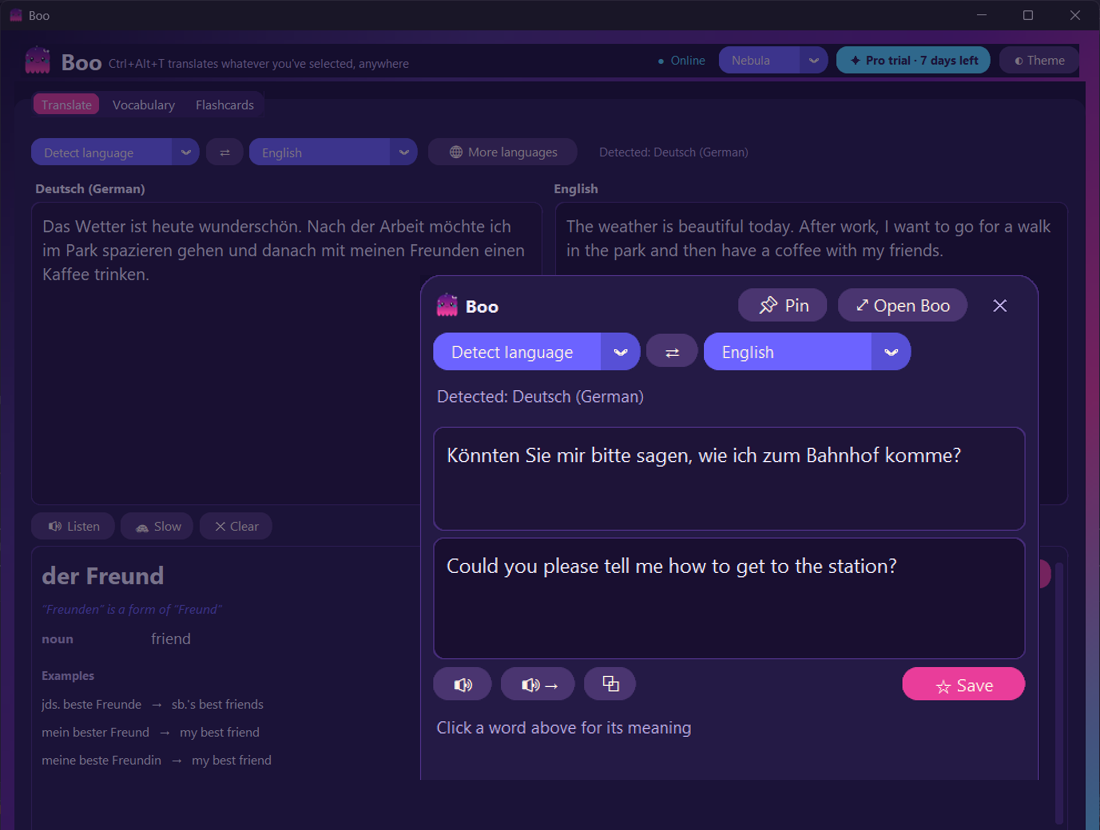
Boo's popup translating a selected German sentence into English, next to a document

Three seconds, any app

No copy-pasting into a browser tab. Boo sits in your tray and comes up right where you're reading.

1

Select text

In a PDF, a browser, Word, WPS, Outlook, Explorer: anything you can highlight.

2

Press Ctrl+Alt+T

A small popup opens next to your cursor with the translation already done.

3

Learn it

Click any word for its meaning, hear it spoken, and save it to your flashcards in one click.

Everything a language learner needs

Built for reading real things in another language, not for typing phrases into a box.

🔒

Private & offline

Translation runs on your own PC. Your text never goes to a server, and it keeps working on a plane.

🌍

51 languages

German, Spanish, French, Japanese, Arabic, Chinese and more, with auto-detect so you don't have to pick.

🔊

Natural voices

Lifelike offline voices for 28 languages read any sentence aloud, or slowed down to catch every sound.

📖

Click-to-look-up dictionary

Meanings, word type and examples for any German or English word, right under your text.

🧠

Flashcards that stick

Saved words come back at growing intervals (spaced repetition), with the sentence you found them in.

📄

Made for PDFs

Rejoins lines that PDFs break mid-sentence, so you get one clean translation instead of fragments.
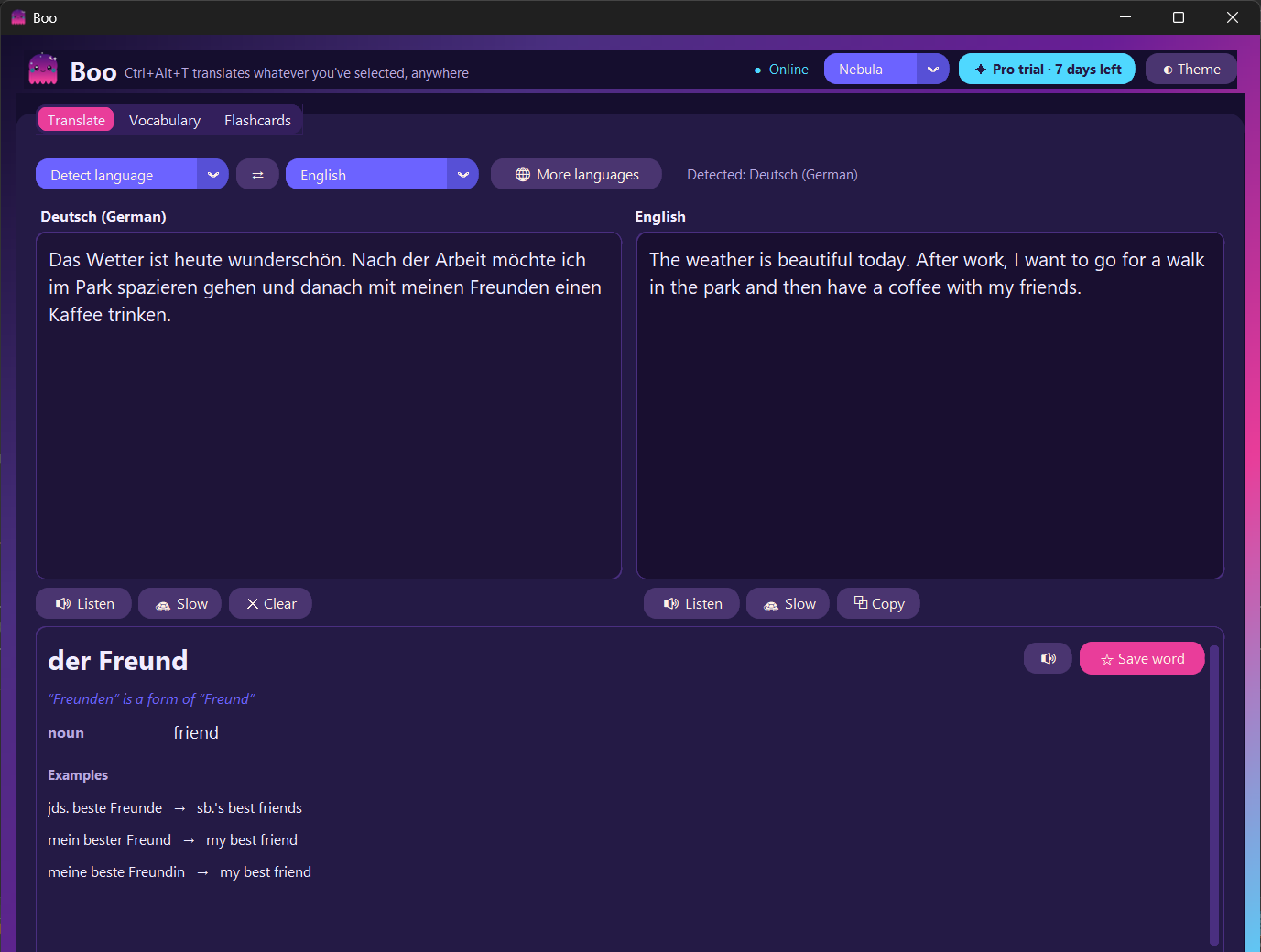
Boo's main window with a German text and its English translation, and a dictionary card below

A full translator when you need more room

Open Boo's window for longer text. Click a word to get its dictionary card, select a phrase to translate just that part, and export your vocabulary to Anki whenever you like.

See what Pro adds →

Start free. Go Pro from $1.50/month.

Every download includes 7 days of Pro. After that, Boo stays free for English plus one language of your choice.

Free

$0
  • English + 1 language
  • Ctrl+Alt+T popup, anywhere
  • Natural voices
  • Dictionary lookups
  • 30 saved words & flashcards
Download
Most flexible

Pro Monthly

$1.50 / month
  • All 51 languages
  • Auto-detect across all of them
  • Unlimited saved words
  • Anki export
  • Every color theme
Get Pro Monthly

Pro Yearly

$6 / year
  • Everything in Pro
  • Just $0.50 a month
  • Cancel anytime
Get Pro Yearly

Pro Lifetime

$18 once
  • Everything in Pro
  • Pay once, keep it forever
  • All future updates
Get Lifetime

Prices in USD; local taxes are added at checkout where required. Your license key arrives by email right away. Paste it into Boo → ✦ Pro.

Questions

Does it really work without internet?

Yes. Translation, voices and the dictionary all run on your PC. You only need a connection to download a new language (once) and to activate Pro.

Which apps does Ctrl+Alt+T work in?

Anything you can select text in: browsers, PDF readers (including WPS and Acrobat), Word, Outlook, chat apps, and even file and folder names in Explorer.

What happens when the 7-day Pro trial ends?

Nothing breaks. Boo keeps working for free with English plus one language you choose, and you can upgrade whenever you like.

Can I use my Pro key on another computer?

Yes. Open Boo → ✦ Pro → "Deactivate on this PC", then enter the same key on the new computer.

How do I cancel a subscription?

Use the "Manage subscription" link in your purchase email. Pro stays active until the end of the period you paid for.

Is my text sent anywhere?

No. Boo never uploads what you translate. The only network requests are language and voice downloads and license checks. See the privacy policy.

Read the world in your language

Free download. Pro from $1.50/month.

⬇ Download Boo for Windows